Facing a clinic management system with no API and export entries buried three menus deep, Talos was used to fetch data in the browser, read across pages, and perform three-layer reconciliation, producing a 12-section business analysis in about 5 minutes.
Project Background
The informatization level of small and medium-sized clinics and chain stores generally remains where it was several years ago: the system can create orders, collect payments, and print, but it has no API. Exporting a detailed statement requires navigating through "Reports → Financial Reconciliation → Transaction Details," switching page tabs, and clicking a small icon in the upper right corner of the table. Generating a monthly business analysis typically takes finance staff over half a day.
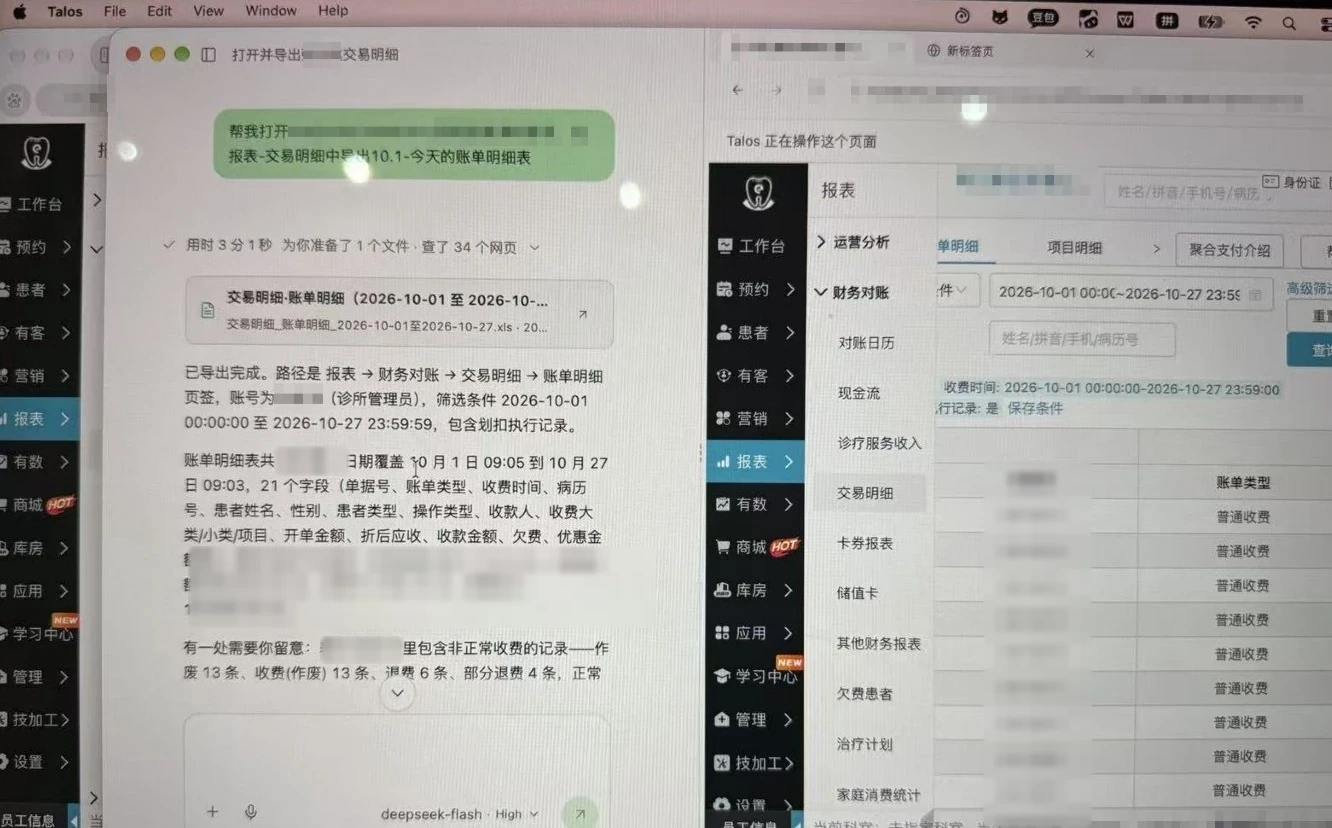
This time, we used Talos to operate this system directly in the browser: exporting a full month's billing data, reading pages without an export button, cross-validating the data, and producing a business analysis report. From exporting the monthly data to finalizing the report, the process took about 5 minutes. There was no need for the vendor to open an interface, nor for IT schedule coordination.
Challenges
Three hurdles all stemmed from the "legacy system" issue. First, with no open API, data retrieval relied entirely on UI operations, requiring manual memorization of menu paths, date formats, and export button locations. Second, the report was embedded within an inline page, and the export function was a gear icon in the upper right corner of the table; reading the entire page couldn't capture the table content. Third, pages like the Warehouse Workbench, Today's Tasks, and Youke CRM had no export button at all—numbers existed only on the screen, and the only way to archive them was manual transcription or screenshots.
The goal was to transform these scattered numbers into a business conclusion presentable directly to the clinic director.
Method
No lengthy scripts were written; the entire process involved just three sentences.
Help me open <clinic management system URL>Reports → Financial Reconciliation → Transaction Details, help me exportNow that we have revenue analysis data, help me analyze the October dataThese three sentences contained four key elements. Provide the entry URL, and Talos takes over the browser to open the system, pausing at the login page and returning control—account credentials are never processed in the conversation. The path is copied verbatim from the system's menu labels, without translation. Dates use colloquial language; "Export October 16th" works without first figuring out the system's accepted format. For analysis, no template was specified. A single sentence "help me analyze the October data" led Talos to deconstruct the dimensions on its own.
The execution process was divided into six steps. Take over the browser and stop at the login page; login is performed manually. Navigate to Reports → Financial Reconciliation → Transaction Details, modify the query date to the entire month, confirm the record count, then click export. The export button was hidden behind a gear icon in the table's upper right corner; Talos opened the menu via the UI and selected export. In a single session, it consecutively exported three files: bill details, item details, and a list of patients with outstanding fees, with filenames including the time range. Read pages without an export button—expiry warnings and quantity warnings on the Warehouse Workbench, today's to-dos on the workbench, and system tasks in Youke CRM—by navigating into each and reading. When a product guidance popup appeared on a page, it was dismissed before proceeding. Local validation: when parsing the Excel files, the final "Total" row was first excluded (the document number field in the total row is empty; summing directly would double the total). Then, the accounts receivable and actual receipts from three sources—bill details, item details, and revenue summary—were aligned. Finally, the report was written and delivered together with the original detailed data.
The report was divided into three parts, totaling 12 sections: Scope & Totals (a reconciliation table from three sources: invoicing, discounts, discounted receivables, actual receipts), Structure & Rhythm (revenue composition, payment methods, new vs. returning patients and sources, physicians, daily trends), and Issues & Actions (stratification of outstanding fees, a data quality issues checklist, and actionable recommendations).
The conclusions didn't rely on data dumping but focused on three key points. The three data sources matched perfectly: the accounts receivable and actual receipts from bill details, item details, and the revenue summary were completely consistent. Cash-type transactions plus medical insurance settlements equaled the actual receipts. Only when every figure could be traced back to its source document was the report ready for delivery. The most critical area for management was high-value bills: roughly 60% of the amount on bills above ¥10,000 remained uncollected. The largest bills had only an initial payment, representing the month's most urgent follow-up tasks. Outstanding fees were a historical accumulation: several hundred patients owed more than ¥1 million in total, and fewer than 10% of them accounted for nearly 20% of the balance. The report stratified these by amount, making it directly usable for creating a collection ledger.
The final section provided five recommended actions: create an installment collection ledger; verify if the low volume at month-end was due to missed transactions; set patient acquisition source as a mandatory field for cashiers; clean up master data naming conventions; and establish a discount approval threshold for high-value items.
Results
| Step | Manual Approach | Talos |
|---|---|---|
| Find Export Entry | Depends on memorizing menus and icon locations | Provide the path verbally; it finds it within the interface |
| Export Details | Click page by page, one file at a time | Consecutively exports three files in one session |
| Pages with No Export Button | Manual transcription or screenshots for archiving | Directly enters the page to read data |
| Data Consistency Validation | Manually compare two sheets | Automatically aligns three data sources |
| Analysis and Report Writing | Half a day or more | Approximately 5 minutes |
| System Modification | Requires vendor to open API or IT scheduling | Not needed; works as long as the UI can be clicked |
Full-month data extraction and analysis took about 5 minutes, producing a 12-section report and three verifiable original detailed files. The entire process involved no modifications to any business data within the system; only querying, exporting, and reading operations were performed.
Business Impact
Systems without APIs no longer require waiting for vendor scheduling. As long as a system that's been live for five years, or software stuck on an older interface version, can be logged into and clicked, data can be retrieved.
A solution exists for pages without an export button. Data that only exists on screen, like warehouse warnings, to-do lists, and customer tasks, can be read directly from the page and compiled into the same report.
Repetitive labor is compressed. In the instructions, only the system URL, menu path, and month need to change. Next month, simply change the date and re-run, with consistent methodology and formatting, eliminating the need to re-align headers for month-over-month comparisons.
The deliverable format is a report plus original details. The conclusions are ready to use, and the numbers can be independently verified, eliminating another round of "should we trust this report" deliberation.
Frequently Asked Questions
The system is very old and has no open API; how does Talos extract data?It operates based on the interface within the browser, following the exact same path a human would click manually: enter the menu, fill in dates, click query, click export. The system needs no modification and no API documentation, only that the account has the corresponding permissions.
What about data on pages without an "Export" button?It directly enters the page to read the content on the screen. The warning quantities on the Warehouse Workbench, today's tasks on the main workbench, and system tasks in the CRM were all retrieved this way. For tables with many columns requiring horizontal scrolling, it's recommended to prioritize finding an export function; if none exists, read page by page.
Will it mis-click and modify data in the system?This entire operation involved only querying, exporting, and page reading; buttons like submit, void, or delete were never touched. For any actions involving write operations, it's recommended to clearly specify the allowed scope in the instructions.
Can this be used with other legacy systems?Yes. The core method involves extracting data by operating a real UI in the browser, local validation, and structuring it into a report. As long as a system is log-in-able, clickable, and displays data, you just need to swap the menu paths and timeframes. This applies similarly to data from retail, restaurant, and tutoring storefronts.