Hand me your idea, I'll make it real, step by step.
Right now I am helping people
Talos is an AI assistant that lives on your computer. Pick an expert role and it puts on the matching skills, tools and persona — reading files, running commands, calling tools to deliver results, not just advice.
Local-first · your data stays on your machine · your model of choice · you stay in control
An AI assistant should do more than chat.
Gets it done, not just advice
Talos reads files, edits code, runs commands in the terminal and calls tools to hand you a working result.
Directory-as-expert, swap in one click
Each role is its own prompt, skills, tools and memory. Switching roles is like swapping in a new expert — and you can build your own.
Local-first, model-free
Chats and files stay on your computer by default; plug in a cloud or local model, and red-line actions are always blocked first.
Pick a role, and Talos becomes it.
Coder, Marketing, MathTutor, Stock Guru… each role is its own set of skills, tools and memory — and you can build more. Click to switch and watch it change.
No preset persona, no dedicated skills — but the full toolset: files, terminal, memory and scheduling. Start here for everyday work, switch to a specialist when you need depth.
One assistant, a whole workflow inside.
Tools & Bash
Read/write files, grep/find, run terminal commands, plan tasks — hands-on.
MCP servers
Connect any external MCP server, expose tools per role with fine-grained filters.
Memory
Four-layer memory: logs, curated notes, searchable facts — secrets redacted first.
Voice
Dictation and auto-send, spoken briefs for progress; local or cloud ASR/TTS.
Media generation
Text-to-image / video via DashScope, Kling, Seedance and more, with reference images.
Scheduled tasks
Run an agent prompt daily/weekly/monthly; notify in-app or via webhook.
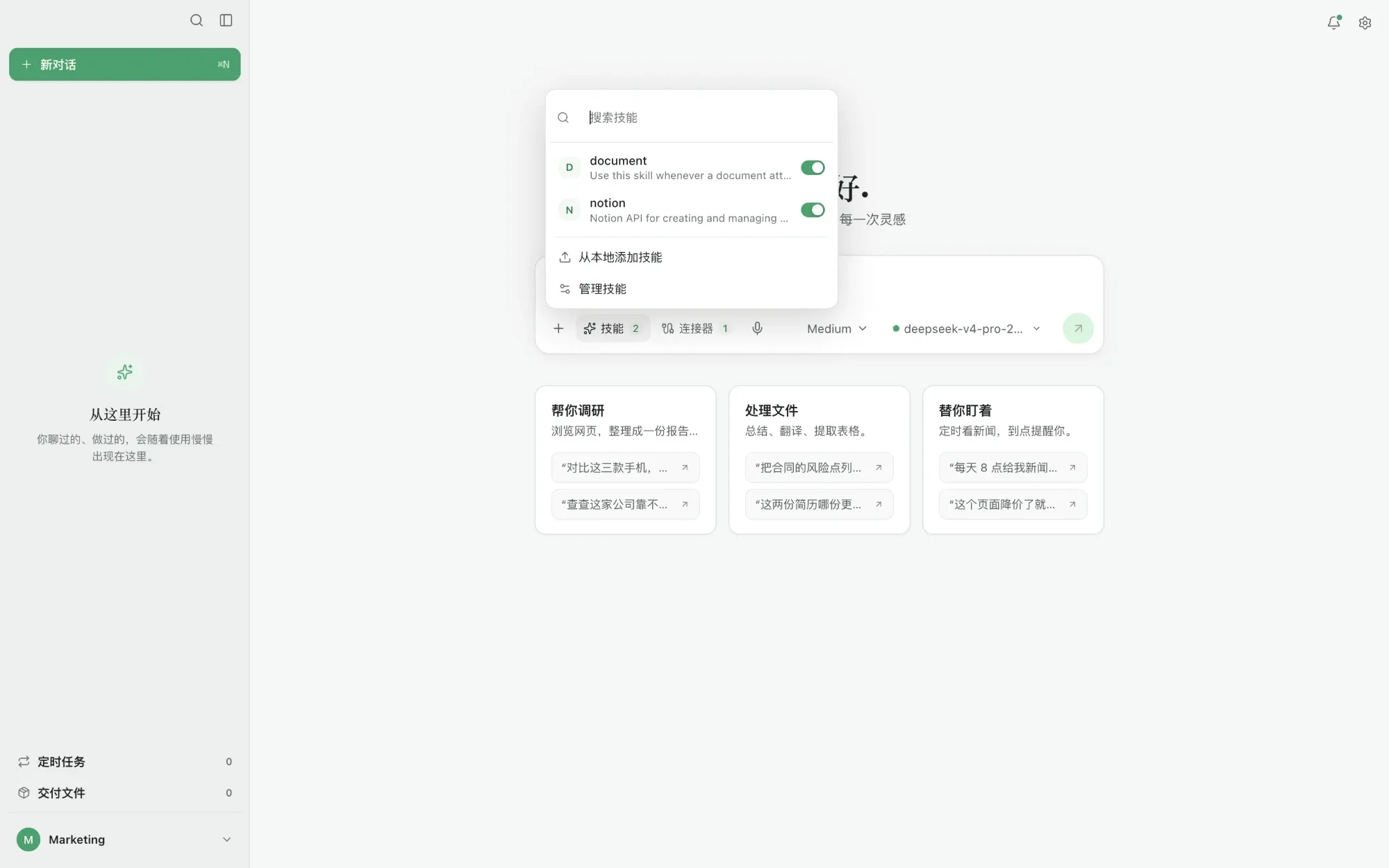
Skills
SKILL.md progressive disclosure, explicit /skill calls, per-role toggles.
Sub-agents
Fan out to parallel headless sessions from one prompt for complex work.
Ready-made tools for real scenarios.
No dozen apps to learn — say what you need and Talos uses the matching skill, tool or model to deliver. A sample of built-in and extensible tools.
Refactor & tests
Reads your repo, refactors and adds passing tests.
Debug errors
Paste an error; it finds the cause and fixes it in the terminal.
Scaffold a project
Spins up structure, deps and base config from scratch.
Audience & positioning
ICP, STP, positioning and GTM as an actionable plan.
Xiaohongshu campaign
Topics, cover copy, comment hooks and metrics.
WeChat article
Turns content into a formatted WeChat article, ready to publish.
Paid media plan
Budget splits, plan structure, creative tests and stop rules.
Trend radar
Live Weibo/Douyin/Bilibili trends, distilled into topics.
Text-to-image
DashScope / Seedream / Nano Banana, with reference images.
Text-to-video
Kling / Seedance / Veo, with first-frame drive and extend.
Long-form & reports
Outline to finished draft, with research and fact-checks.
Docs & slides
Produces openable PPT, PDF and spreadsheet files.
Reports & notes
Turns scattered notes into a clean weekly report or minutes.
Scheduled briefing
Runs a prompt on schedule; results to app or webhook.
Trip planning
Itinerary, budget and checklist, sorted as you speak.
Voice assistant
Hands-free: speak your ask, hear the result brief.
Nail these scenarios first.
Phase 1 focuses on nine high-frequency scenarios across research, office, data, automation and growth — each one demo-ready.
Research → deck
Web search plus your local docs, summarized into a clean, editable slide deck.
PPT · PDF · Word
Convert and format across slides, PDF and docs — openable files in one step.
Excel statistics
Stats, pivots and charts over your spreadsheets — conclusions without formulas.
Math solving & plots
Triangles, ellipses and more: step-by-step solutions with accurate figures.
A-shares & filings
Quotes and financial reports distilled into key metrics and charts.
General automation
Orchestrate multi-step flows into one prompt across apps and files, on a schedule too.
WhatsApp · Telegram
Read, draft and route messages by rules — chat automation wired into your workflow.
Business analytics
Bring in internal data for operating analysis and dashboards with reportable takeaways.
Auto-post to Xiaohongshu
Topics, copy and covers, then auto-publish to Xiaohongshu — scheduled too.
Work, life and code — hand it all over.
Hand off the repetitive.
Notes, email, spreadsheets, research, reports — get your hours back for what matters.
- Weekly reports from one sentence
- Long docs, straight to conclusions
- Multi-step tasks run to a finished file
Your data, your call.
Bring it onto your computer now.
Free download for macOS and Windows — installed in seconds.